Posts mit dem Label Opensource werden angezeigt. Alle Posts anzeigen

20150117

DMR with DSD on Bananapi?

Hello.

On RTL-SDR addicted blog RTL-SDR.com I read about how to build DSD (Digital Speech Decoder Toolchain) on Linux. Therefore I tried to deocode DMR with this toolchain on Bananapi. The question that has to be answered was: has Bananapi enough power to receive DMR broadcasts and decode data stream with DSD same time? The answer is: almost.


Even if Bananapi has two CPU cores with about 1GHz something seems to be not right. As you can see Bananapi takes "only" 70% CPU on both cores. But the result of the decoded datastream exported as wav file is, uhm, very choppy.


I don't think that problem is power of the signal itself. It's about 20dB above noise.

To be continued...

20140801

waterfall.py by keenerd

Hi.

T'day I'm trying waterfall.py by keenderd the first time. You can download the script from here: https://github.com/keenerd/rtlsdr-waterfall.

CLick to enlarge

If you start the script with python waterfall.py 935000000 960000000 for example you'll get a result like the one in the picture above. It's showing the GSM 900 band with hopping and non-hopping signals.


20131116

RTLSDR: rtl_power - another example

Hello,

yesterday I used rtl_power to create another heatmap. It covers the frequency range from 3 MHz to 5 Mhz.

Have a look at here, please:

http://www.qth.at/de8msh/bilder/heatmaps/hf.png

ATTENTION: this picture has a size of 17 MB! :)

As you can see there are many stations that come an go again. Ham radio stations, BC stations, Stanag 4285 and many more...


20131114

RTLSDR: rtl_power

Hi.

There's a new utility in the famous RTLSDR package: rtl_power. Coder keenerd says about it:

Rtl_power is a small CLI tool for logging wide swaths of bandwidth. You can specify any chunk of spectrum, with any FFT bin size and any logging rate. (For sane values of any.)


Read more at reddit:


http://www.reddit.com/r/RTLSDR/comments/1kpf3m/new_utility_rtl_power/

I've done a hf scan with rtl_power lately. It shows a spectrum graphic from 3MHz to about 15MHz.

You can see it here:

http://picpaste.de/pics/hf_3M_15M_2.1384457866.jpg

Attention: it's a big picture! ;)

You can see many bc stations that come and go. OTHR are visible, too. And many other stations.

My setup was a DVB-Tstick modified as direct sampler. I connected my 12m wire to it.

It's a very cheat solution for non realtime / longterm hf band observations. But you can also use it with a unmodified DVB-T stick, too.

And now have some fun with rtl_power :)

20121225

Project: Raspberry Pi and WSPR

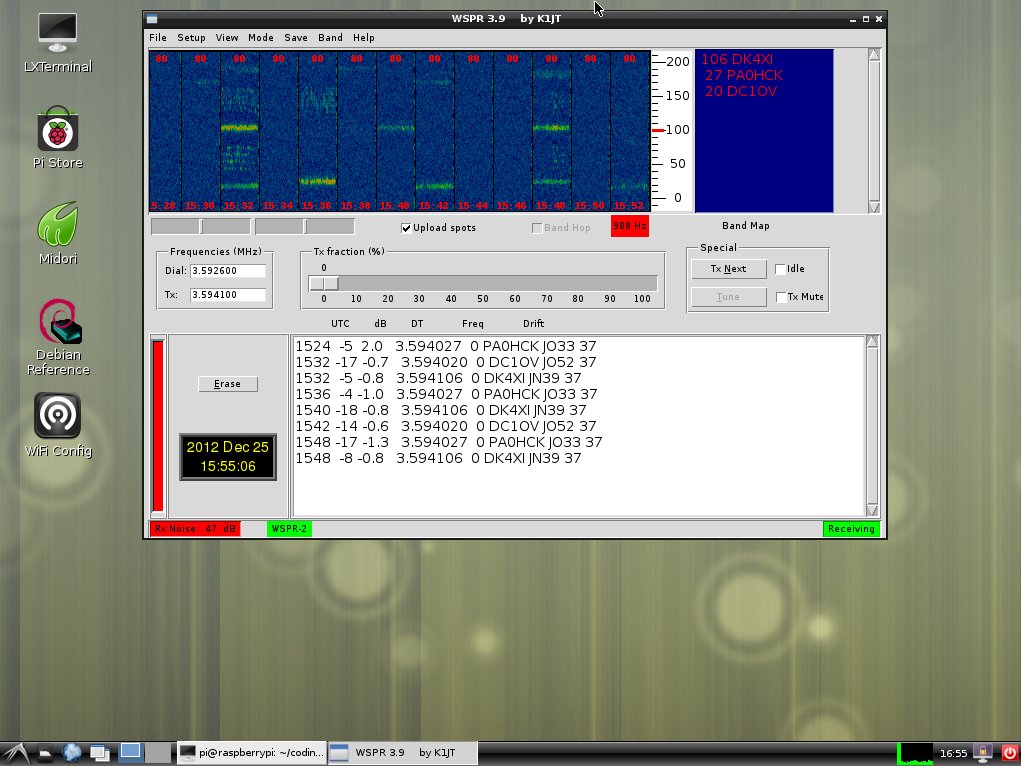
Today I managed it to build WSPR_r2840 on Raspberry Pi with latest Raspian.


I used the info from here. But instead doing 

svn co http://svn.berlios.de/svnroot/repos/wsjt/branches/wspr

you have to do

svn co http://svn.berlios.de/svnroot/repos/wsjt/branches/wspr -r2840 

The latest version of WSPR creates a bug and you cannot build it on RPi. Thank you to Jean-michel of WSPRnet forum.

My setup is:

- RPi in 900MHz mode.
- Inexpensive USB soundcard stick 
- WSPR_r2840
- USB hub with four ports
- WiFi stick
- Yaesu FRG-100


20121028

Project: Arduino on TP-Link TL-WR703N

Hello,

after a few "years" of break I'm in love /w Arduino, again. At the same time I'm in love with TP-Link TL-WR703N router, too. Altogether this is the result:

http://incaseyoureat.dyndns.org/cgi-bin/weather


This is the original project: 


http://www.instructables.com/id/How-to-set-up-OpenWRT-on-a-pocket-router-WR703N/ .

Setup:
TP-Link TL-WR703N with OpenWRT
Arduino with DS18S20

Every five minuets the Arduino sends temperature data via serial/USB to router. It gets the data and posts it to Xively (ex COSM ex Pachube ex ???).


Furthermore it writes data to text file that a script reads out. Google Charts shows it then.

Simple as is.

20120917

Howto build a RTL-SDR environment on Ubuntu 10.04LTS

Preface

Goal is to create a RTL-SDR environment for compiling software for this fine and cheap dongle. The tutorial based on the operation system Ubuntu 10.04LTS. The reason is that my PC has a Duocore 2GHz with 2GB ram, only. On this machina Ubuntu 12.xx works not very well. 

In two or three hours you have your own the RTL-SDR toolchain.


Building a boot medium

Download the Ubuntu 10.04LTS ISO file from this server http://releases.ubuntu.com/lucid/ . Burn the ISO on DVD or copy it on an USB stick with UNetbootin

Boot and installation 

After you burned the ISO to DVD or copied it to USB stick, you have to boot from this medium. At the beginning you have to answer several questions about username, userpassword, partition etc. This parts is not far away from Windows OS. If you will be asked for username take "rtlsdruser", please. This user is used for sudo rights later on.
Ubuntu will be installed now. It takes about 30 minutes - more or less. At the end you will be asked to reboot. Do it and choose Ubuntu for your favorite OS now.

Important upgrades, updates etc.

After rebooting it is important to do the upgrades and updates. Otherwise the RTL-SDR toolchain will work nonsatisfying. So follow this tutorial step for step.Building a boot medium
Note: for sudo command mentioned later on you have to type the password you gave at installation.
  • Choose Software Sources. slider Other software. Ckeck Lucid Partner.
  • Press [ALT F2] and type gnome-terminal. Press [ENTER].
  • Type sudo apt-get upgrade. Press [ENTER]. Press [Y] if needed.
  • Type sudo apt-get udate. Press [ENTER]. Press [Y] if needed.

Needed packets and modules

To compile Osmocom software and other RTL-SDR related stuff you have to do this apt installations;:
  • sudo apt-get install build-essentials cmake git-core libboost-all-dev libusb-1.0-0-dev  python-scitools portaudio19-dev -y and press [ENTER].

Gnuradio, Sourcecodes etc.

Now you can compile several software from Osmocom. At first create a directory called coding
  • mkdir coding  and press [ENTER]. 
  • cd coding  and press [ENTER]. 

Gnuradio

This will build the big Gnuradio environment.
  • wget http://www.sbrac.org/files/build-gnuradio  and press [ENTER]. 
  • chmod 755 build-gnuradio and press [ENTER]. 
  • ./build-gnuradio  and press [ENTER]. Confirm with [Y] and [Y]. Then you have to wait long long time :).

Libosmocore

Thie will build the Libosmocore environment. It's needed for several Osmocom software like Tetra.
  • git clone git://git.osmocom.org/libosmocore.git and press [ENTER]. 
  • cd libosmocore/ and press [ENTER]. 
  • autoreconf -i and press [ENTER]. 
  • ./configure and press [ENTER]. 
  • make && sudo make install and press [ENTER]. 
  • cd ..  and press [ENTER]. 
  • sudo ldconfig  and press [ENTER]. 
  • sudio gnuradio_companion  and press [ENTER]. It starts Gnuradio. Everthing OK? Then close it again.

Now you can compile most of the software listed on Osmocom page

For e.g.:

gr-air-modes, der ADS-B decoder/server

This will build ADS-B deocder.
  • git clone git://github.com/bistromath/gr-air-modes.git  and press [ENTER]. 
  • cd gr-air-modes  and press [ENTER]. 
  • mkdir build  and press [ENTER]. 
  • cd build  and press [ENTER]. 
  • cmake ../  and press [ENTER]. 
  • make && sudo make install  and press [ENTER]. 
  • cd ..  and press [ENTER]. 
  • cd ..  and press [ENTER]. 
  • Type gr-air-modes -d -P for start. Type gr-air-modes --help for help.

gr-air, der AIS decoder/server

This will build AIS decoder.
  • git clone git://github.com/chgans/gr-ais.git  and press [ENTER]. 
  • cd gr-ais  and press [ENTER]. 
  • mkdir build  and press [ENTER]. 
  • cd build  and press [ENTER]. 
  • cmake ../  and press [ENTER]. 
  • make && sudo make install  and press [ENTER]. 
  • cd ..  and press [ENTER]. 
  • cd ..  and press [ENTER]. 
  • Start decoder witht ais_rx.py -d -e-130. Note: the -e value has to be researched with SDR# (dongle window / PPM value). Type ais_rx.py --help for help.

Result

Now it is possible to compile most of the RTL-SDR software.


Good luck